-3.png?width=250&height=31&name=getground-full-light%20(3)-3.png)
You can change property details — including the property address, property price, completion date, and mortgage information — at any time through your GetGround dashboard. The steps below apply once your company has been incorporated.
If your company has been incorporated
- Log in to your GetGround dashboard.
- Under the "Properties" menu, choose the relevant property
- Click "Manage" and select "Edit property details"
- Select "Request a change".
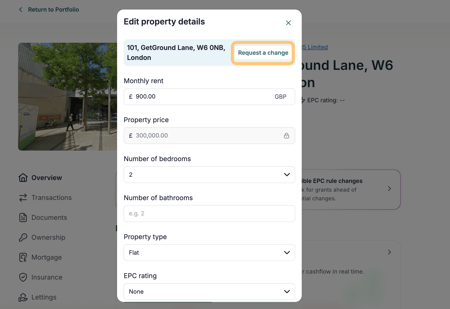
Once you've landed on the change request page, you'll then need to select which information you would like to change. This can be either:
- Property Address: The street address and postal code of your property
- Purchase details: The property price, whether you're using a mortgage, or completion date.
You can change all of these details at the same time. You'll just need to click on the Change button to the right of the screen and fill out the information requested.
Once you've provided the information, you should then be able to review the changes that you would like to make. If all the details are correct, click Agree and submit. This will then update the details on your account and update any necessary incorporation documents for you to sign.
Please note: changes to the property address or property price are not complete until these documents have been signed by all shareholders. If you are not the sole shareholder of your company, all other shareholders will receive an email notification prompting them to sign.
If you have other shareholders that need to sign the documents, they will be able to do so by accessing the Tasks on their dashboard.
Depending on whether you incorporated your company through GetGround’s platform or not, this process is slightly different.
What if my company is not yet incorporated?
If your company has not yet been incorporated, you will not be able to update this information through your dashboard at this stage. Please contact our support team, who will be happy to assist you with updating your property details.